


Introduction
We recently encountered an interesting problem when using Turbo Streams to update part of a complex nested form in FreeAgent’s main Ruby on Rails web application.
For those unfamiliar, nested forms allow a user to enter data relating to both a main parent object and its associated objects. This could be, for example, a contact form which also supports creating and editing multiple associated addresses.
To illustrate the problem we encountered, we’ll use the following example of a “New Order” form which lets the user enter data relating to the order itself (the order description), in addition to entering data about the products included in the order (the product name and quantity).
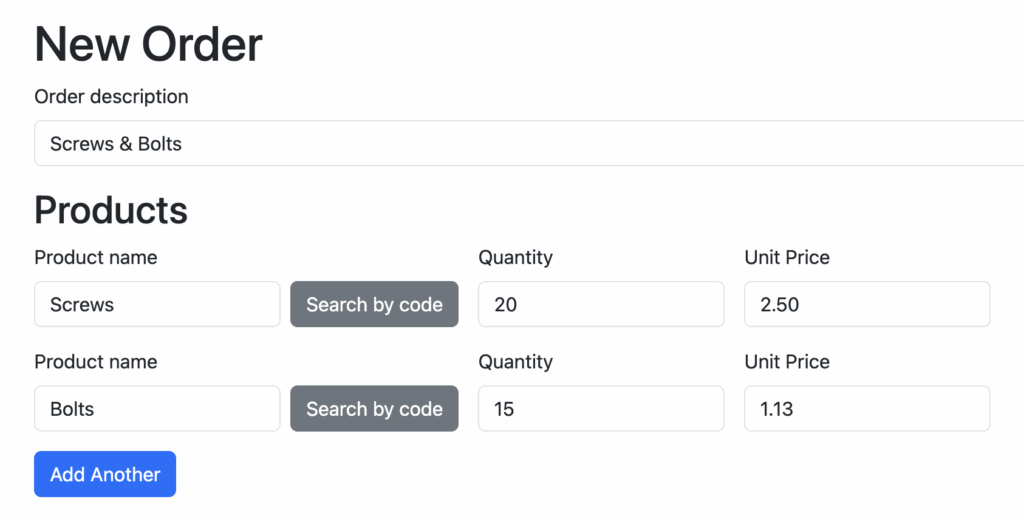
In Action View—the core ‘view layer’ component of Ruby on Rails—nested fields such as those for creating or editing products in this example are typically generated by using the fields_for helper.
<%= form_with(model: @order) do |f| %>
  <% # ... %>
  <%= f.fields_for(:products) do |products_form| %>
    <%= products_form.label(:name, "Product Name") %>
    <%= products_form.text_field(:name) %>

    <%= products_form.label(:quantity) %>
    <%= products_form.number_field(:quantity) %>
    <% # ... %>
  <% end %>
<% end %>
Which results in the following HTML markup.
<form action="/orders" method="post">
  <!-- ... -->
  <label for="order_products_attributes_0_description">
    Product Name
  </label>
  <input name="order[products_attributes][0][description]"
         id="order_products_attributes_0_description"
         type="text">

  <label for="order_products_attributes_0_quantity">
    Quantity
  </label>
  <input name="order[products_attributes][0][quantity]"
         id="order_products_attributes_0_quantity"
         type="number">
  <!-- ... -->
</form>
Nested fields are grouped using an index
Note that all of the fields relating to a particular product are grouped together using an index (zero in the example markup above). This is expected to be different for each product.
For products included in the order on page load, fields_for will generate a 0..n index sequence to group related products together.
For products added after page load, e.g., using the “Add Another” button, a common pattern is to generate a timestamp-based index to encourage uniqueness. In our case—and this will become relevant further on—we were inserting new product fields onto the page (and generating the associated timestamp) using some JavaScript on the client.

Our JavaScript-based “Add Another” button worked by using a template element holding the markup for a new nested product to insert a new product into the DOM, and using GitHub’s template parts library to insert the index in the relevant places.
The markup for product fields added dynamically after page load will look something like this:
<label for="order_products_attributes_1763135532_description">
    Product Name
</label>
<input name="order[products_attributes][1763135532][description]"
       id="order_products_attributes_1763135532_description"
       type="text">
<input name="order[products_attributes][1763135532][quantity]"
       id="order_products_attributes_1763135532_quantity"
       type="number">
<!-- ... -->
The complexity of adding a Turbo Stream
This example demonstrates how indexes are generated to group related nested fields at two points: when the server renders the page, using a 0..n index, and dynamically in the browser, using a timestamp.
At FreeAgent, this worked well for us until we introduced some server-side rendering with Turbo Streams.
To demonstrate why, let’s add that to our example order page scenario.
Let’s say that each nested product form also has a “Search by code” button, which opens a modal that allows a user to find a product name by its code. In FreeAgent, our modals are implemented using Turbo Streams, so hitting the “Search by code” button will request a server-rendered change to the page that the browser will act on using JavaScript.
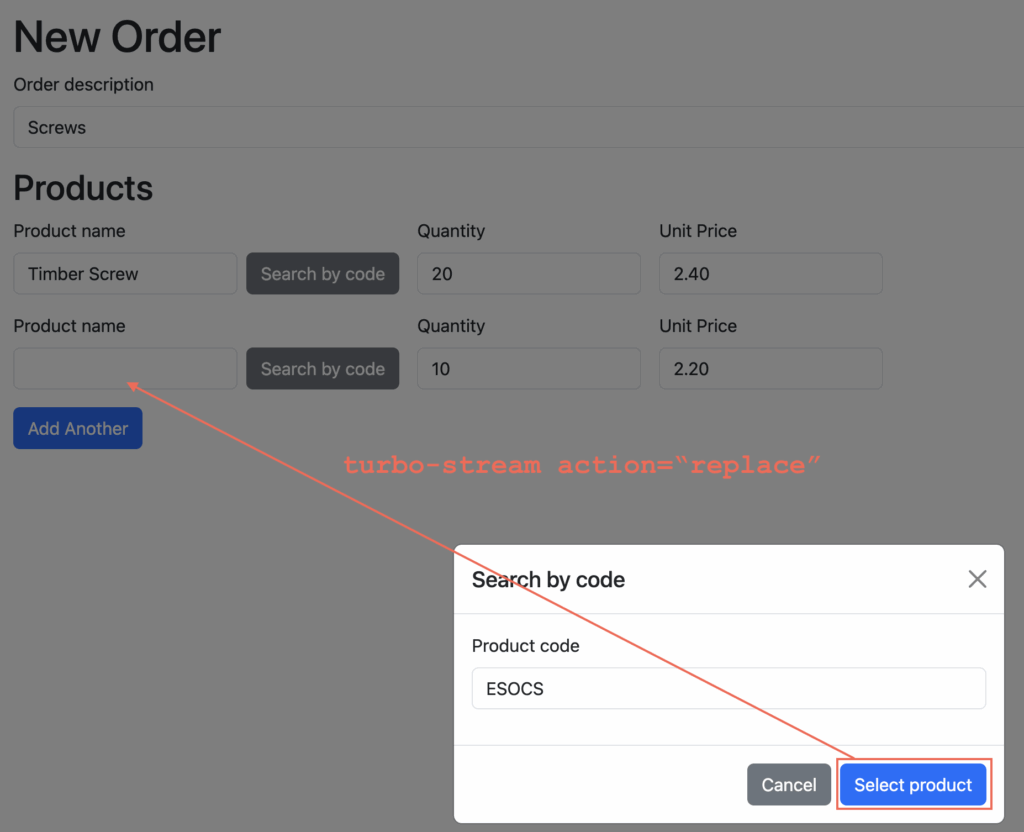
We’ll pass the current product’s index to the modal so it knows which specific product line to update upon submission.
Once the user enters a product code and hits the “Select product” button, we’ll use a Turbo Stream to replace the “Product name” field of the row in which we opened this “Search by code” modal.
That means we need to think about how to work with the nested form indexes.
Since Action View groups nested related fields together using an index, we’ll need to make sure that our Turbo Stream response keeps the replaced field in the same group of nested attributes. To do that, it’ll need to retain the same nested field index as the rest of the product attributes (the quantity and unit price).
Luckily, the index we need is stored as a property on the form builder object.
That means that it can be encoded as a URL parameter into the request that triggers our Turbo-based “Search by code” modal.
<%= f.fields_for(:products) do |f| %>
  <% # ... %>
  <%= link_to(
    product_search_by_code_path(index: f.index),
    data: { turbo_stream: true }
  ) %>
<% end %>
The “Search by code” form can then store the index in a hidden field so that when it’s submitted, the Turbo Stream response can set this index in the view template it renders.
<%= form_with(url: product_search_by_code_path, method: :post) do |f| %>
  <%= hidden_field_tag(:index, params[:index]) %>
  <% # ... %>
<% end %>
<%= turbo_stream.replace("product_#{params[:index]}") do %>
  <%= fields_for(
    "order[products_attributes][]",
    index: params[:index]
  ) do |f| %>
    <% # ... %>
  <% end %>
<% end %>
Moving away from JavaScript templating
Great, this seems like a reliable way of retaining the same nested field attribute index through a server-rendered Turbo Stream request… as long as the index was originally accessible as a property of the form builder object.
Unfortunately in this case, when we click the “Add another” button, the new product fields are added to the page using purely some JavaScript on the client, not the server.
Since the timestamp-based index is purely generated and inserted using some client-side JavaScript, the index property is not updated on the form builder object, so its value remains nil.
The “Search by code” links for products added by the “Add Another” button will therefore contain a blank index. When the “Search by code” modal form is submitted, the Turbo Stream response won’t retain the correct index which will cause problems later on when the whole “New Order” form is submitted and processed by the server.
<a href="/products/search_by_code?index="
   data-turbo-stream="true">
To fix this on the client, we’d need to update our new product template element to contain a placeholder for the index URL parameter and update our JavaScript code to also insert the index there too.
However, we decided to avoid convoluting our JavaScript code entirely by replacing it. We moved the responsibility of adding new product fields from the client to the server using (another) Turbo Stream. When this adds a new row to the table, it sets the index property on the form builder in the view template so that the modal knows what to update. This means we’re also moving to server-side rendering as opposed to client-side rendering in JavaScript in this scenario.
<%= turbo_stream.append("product_fields") do %>
  <%= fields_for(
    "order[product_attributes][]",
    index: Time.current.to_i
  ) do |f| %>
    <% # ... %>
  <% end %>
<% end %>
Now we can also rely on the form builder’s index property for products added by the “Add Another” button, which saves us the duplication of inserting this client-side.
<a href="/products/search_by_code?index=1763135532"
   data-turbo-stream="true">
Conclusion
In conclusion, when using Turbo to update part of a set of nested fields in a Rails app, consider using the index property on the form builder. This can be very convenient, but if you’re adding markup to the DOM on the client that could also get replaced by the same Turbo Stream, then you might encounter a similar gotcha: the form builder might not have the index attribute set if it was inserted after page render by JavaScript. You may be able to—like us—simplify the whole flow by adding new nested fields using a Turbo Stream too and setting the index property in the response so it can be accessed easily when you need it.