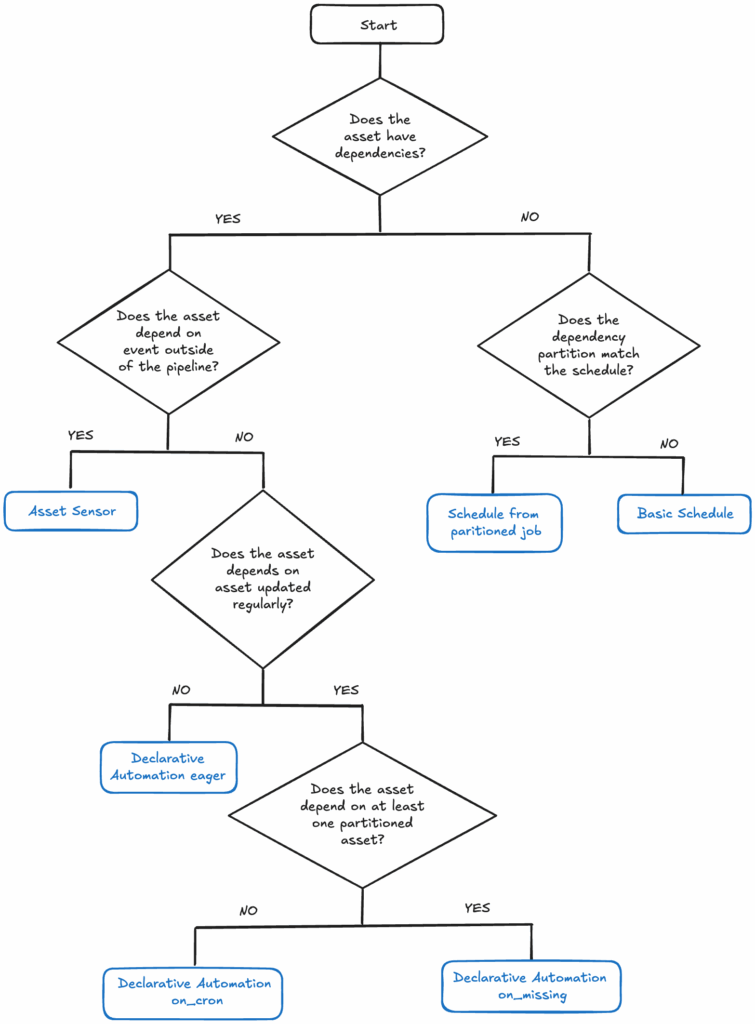


Introduction
The heart of a reliable data platform are robust and automated data pipelines. As our team migrates our data pipelines to Dagster, re-architecting our automation logic is a crucial task. Dagster offers condition-based approaches to creating or updating a data asset (table or file), moving us toward a modern, asset-centric view of data.
This post details the three primary automation strategies we considered and implemented (so far) in Dagster—Schedules, Declarative Automation, and Asset Sensors—to ensure the materialisation of our assets is completely automated.
Automation Options in Dagster
Dagster provides several powerful ways to automate pipeline execution based on specific prerequisites. For our migration, we focused on:
Schedules

Dagster Schedules are the most straightforward approach, perfect for time-based triggers. A schedule is constructed from a job definition, which triggers asset materialization at a specific time or on a regular interval.
We leverage Dagster Schedules primarily when an asset has no upstream asset dependencies that would naturally trigger it, such as extracting source data from APIs.
We use Dagster’s build_schedule_from_partitioned_job method when the time-based partitions defined in the job match the schedule interval. For example, when the job is scheduled to run once per day and output to daily partitions.
Where we want to run the schedule at a different frequency than the job partition, we use a basic schedule with a cron expression using Dagster’s @schedule decorator.
Declarative Automation

Declarative automation is the approach recommended by the Dagster team as the default choice, reserving other methods for more complex edge cases. This method uses information about asset dependencies and their materialization status to determine when to trigger execution.
It relies on the default_automation_condition_sensor, which checks the conditions on all assets with declarative automation approximately every 30 seconds.
To illustrate its mechanics, consider Asset C, which depends on two other assets (Asset A and Asset B):
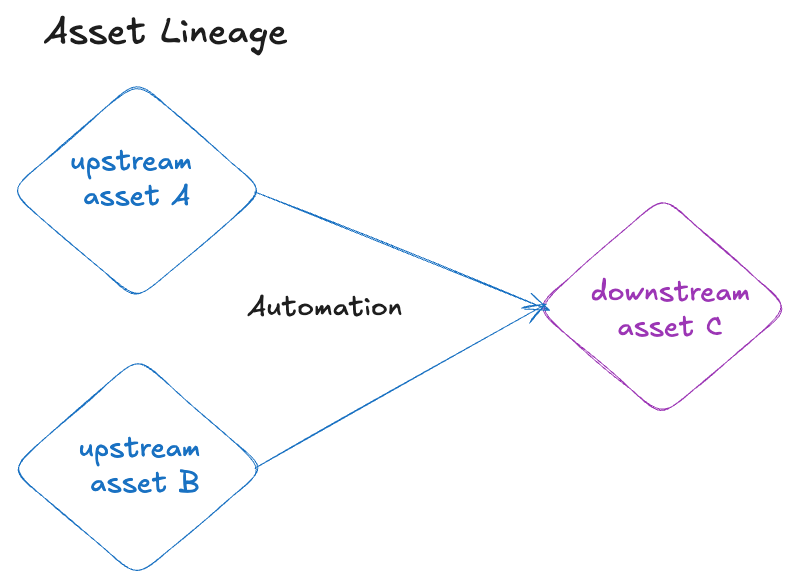
We will describe how different automation conditions will trigger the materialisation of downstream asset C.
Partitioned upstream dependencies
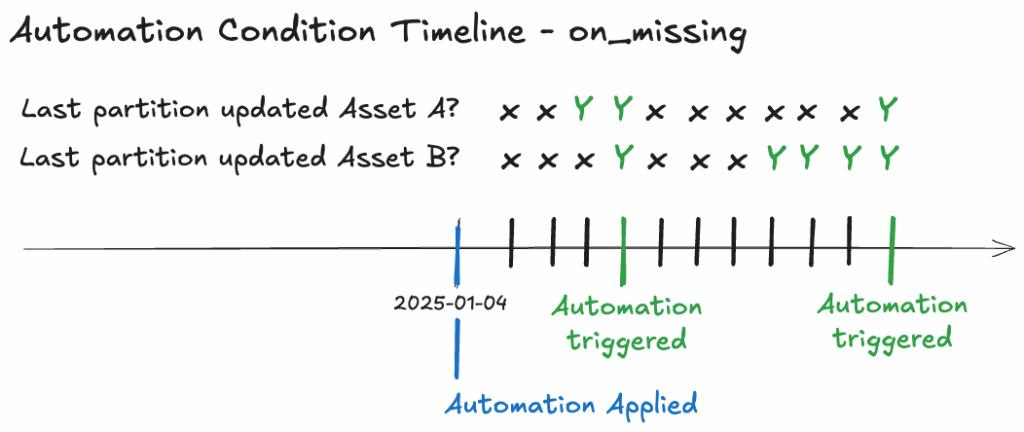
AutomationCondition.on_missing() triggers when all upstream dependencies have been updated for partitions after the condition was applied. It requires all historical data for the upstream dependencies to be present.
If an asset’s automation is applied on 2025-01-04, and its upstream asset’s partitions were last materialized on 2025-01-03, the downstream asset (Asset C) will only trigger once all upstream data for 2025-01-04 onwards is available. The default_automation_condition_sensor ticks every 30 seconds, and when the latest partitions for Asset A and Asset B are updated, it triggers the materialization of that partition for Asset C.
Upstream dependencies include full-rebuild assets
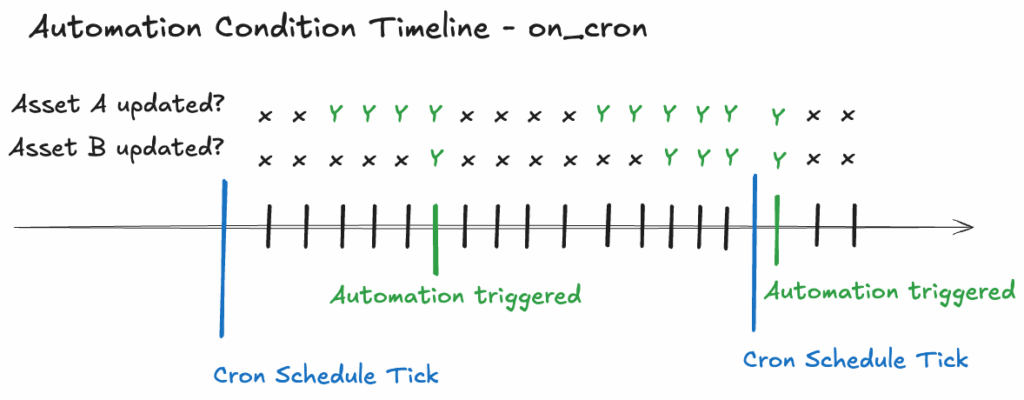
AutomationCondition.on_cron() accepts a cron schedule expression that triggers once per tick, provided all upstream dependencies have been updated since the last tick.
If we set an on_cron automation to tick at 5:00 AM daily, the default_automation_condition_sensor will tick every 30 seconds after 5:00 AM. When both Asset A and Asset B have been updated, the automation will trigger a full rebuild of Asset C. This will be the only update to asset C until the next cron schedule tick, the next day at 5:00 AM.
Infrequently changing upstream dependencies
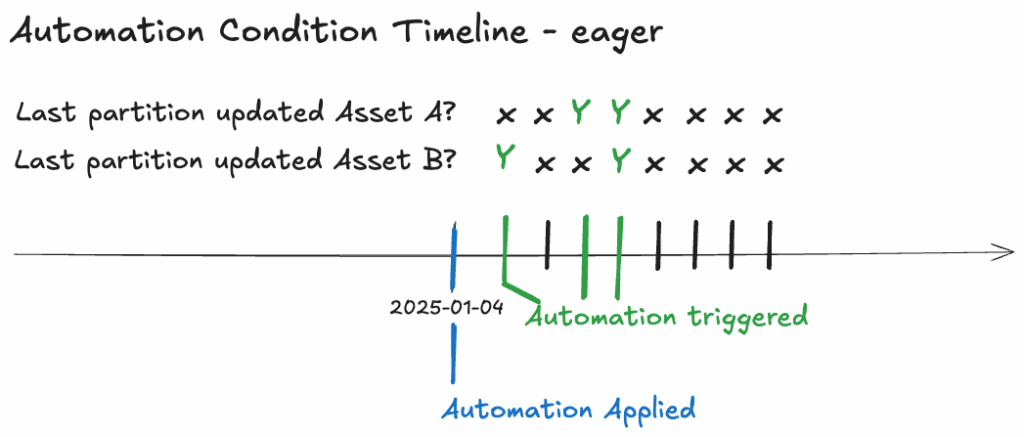
For assets dependent on upstream data that is infrequently updated, we employ the eager declarative automation approach. AutomationCondition.eager() is utilised to trigger materialization whenever any of the upstream dependencies have been updated.
Consider a scenario where the downstream Asset C depends on two assets: Asset A, a table that updates daily, and Asset B, a dbt seed (CSV file) mapping country codes to country name, which is infrequently updated. To ensure Asset C materializes daily following the update of Asset A, the eager declarative automation approach is employed.
Additional Automation Conditions
Declarative automation allows for combining and modifying automation conditions for fine-grained control. Here are some of the automation conditions we have also looked into.
Additional rules
Below are a selection of additional rules we have considered when testing the automation condition:
- Ignoring Missing Data:
.without(AutomationCondition.any_deps_missing())will trigger the materialization of the asset even if some historical upstream data is missing. - Updating Older Partitions:
.without(AutomationCondition.in_latest_time_window()) will trigger the materialization of the asset when any partition is updated, not just the latest. - Enforcing Data Quality: Combine the primary condition with
AutomationCondition.all_deps_blocking_checks_passed()to ensure upstream data quality checks succeed before materialization. - Ignoring updates to a dependency: by default the automation conditions
on_cronandon_missingwill wait for all upstream dependencies to be updated before executing. In some cases it can be useful to ignore a dependency update with.ignore(dg.AssetSelection.assets("foo"))..ignorewill ignore updates to an upstream asset providing it has been materialized in the past.
Asset Sensor

An Asset Sensor is a form of Dagster automation that triggers a job when a new materialization for a specific upstream asset occurs. We use asset sensors for assets that depend on events triggered outside of the data pipeline.
Although custom asset sensors provide an effective mechanism for automating downstream asset materialization, we ultimately opted for declarative automation in our production environment. The declarative approach simplifies the overall architecture by eliminating the need for multiple distinct jobs and sensors. This is achieved through a simpler implementation that leverages metadata configuration directly within the dbt assets .yml file.
Summary of Automation Options
To completely automate our data pipeline, we implemented two key automation strategies in Dagster: Schedules and Declarative Automation.
Declarative Automation, the recommended asset-centric approach, serves as our default choice, triggering execution based on successful upstream materialization. Schedules are used for time-based triggers where no upstream dependency exists.
| Automation Strategy | Primary Use Case | Trigger Mechanism | Key Benefit | Complexity |
|---|---|---|---|---|
| Schedules | Time-based execution with no upstream data dependency. | Cron Expression | Simple to set up for fixed-time runs. | Low |
| Declarative Automation | Execution based on successful upstream asset materialization. | Asset Dependencies, Materialization Status, and Conditions | Simplifies architecture, uses metadata in dbt. | Medium |
Asset Sensor | Execution based on a specific, single upstream asset’s materialization event. | Event log entry of an upstream asset. | Provides the most granular control over the upstream event and downstream run logic. | High |
Automation workflow